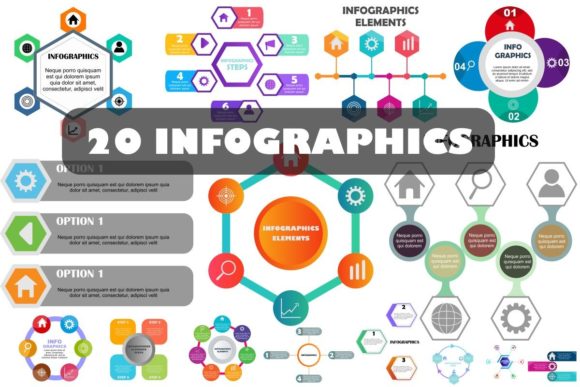
Infographics Design Bundle: Streamline Visual Content
Creating high-impact visual content often feels like a choice between spending hours designing from scratch or paying a premium for custom illustration. The Infographics Design Bundle bridges this gap by providing a comprehensive library of pre-built, fully customizable assets tailored for modern workflows. Whether you are a marketing manager preparing a quarterly report, an educator simplifying complex biology concepts, or a freelancer juggling multiple client deadlines, having a reliable repository of vector-based design elements is essential for maintaining consistency and speed without sacrificing quality.
This collection is not merely a set of static templates; it is a modular system designed for flexibility. By offering 100 resizable vector shapes and organized layers, it allows creators to build unique visuals that align with specific brand guidelines rather than forcing content into rigid, pre-designed molds. The true value lies in the balance between ready-to-use convenience and deep editability, making professional-grade infographic creation accessible to those without advanced illustration skills.
Comprehensive File Format Compatibility
One of the most significant friction points in digital design is file compatibility. A beautiful asset is useless if it cannot be opened in your preferred software or exported for your intended platform. This bundle addresses that challenge by including a wide spectrum of formats to cover every stage of the production pipeline.
- Vector AI & EPS: These are the industry standards for Adobe Illustrator users. They allow for infinite scaling and complete manipulation of anchor points, ensuring your graphics remain crisp whether printed on a business card or a billboard.
- Vector SVG: Essential for web designers and developers. SVG files maintain perfect clarity on retina displays and can be animated or styled directly with CSS, making them ideal for responsive websites and interactive dashboards.
- Vector CMX: A crucial inclusion for CorelDRAW users. Many bundles overlook this format, leaving a significant portion of the print and sign-making community underserved. Its inclusion here ensures broader accessibility.
- Image JPG & PNG: Not every project requires a vector editing suite. High-resolution raster versions are included for quick insertion into PowerPoint presentations, Word documents, or social media posts where vector support is limited.
The inclusion of transparent PNGs deserves special mention. For marketers and bloggers, being able to drag and drop a pre-rendered graphic onto a colored background without worrying about white boxes or jagged edges saves considerable time during the final assembly phase.
Editability and Color Management
A common frustration with stock infographic elements is the difficulty of changing colors to match a specific brand palette. Many resources use flattened images or complex gradient meshes that resist simple recoloring. This bundle prioritizes usability with a "possible and easy change color" architecture. Because the assets are built with clean vector paths and organized layers, you can typically select all elements of a specific hue and swap them globally in seconds.
This feature is particularly valuable for agencies and freelancers managing multiple brands. Instead of purchasing separate packs for each client, you can adapt the same core shape library to fit distinct visual identities. The 100 organized layers mean you won't waste time hunting through nested groups or unlocking hidden objects just to adjust a background tone. This structural clarity transforms what could be a tedious technical task into a swift creative adjustment.
Practical Applications Across Industries
The versatility of the Infographics Design Bundle extends far beyond traditional data visualization. While it excels at turning statistics into engaging charts, its utility spans various professional and personal contexts.
Corporate Communication: Internal newsletters and annual reports often suffer from text density. Using these vector shapes to break up long-form content helps improve readability and retention. HR departments can use them to visualize onboarding processes, while sales teams can create compelling comparison sheets that highlight product advantages clearly.
Education and Training: Educators and corporate trainers frequently need to explain abstract concepts. The 100 resizable vector shapes serve as excellent building blocks for diagrams, timelines, and process flows. Because they are print-ready, teachers can confidently include them in handouts and worksheets without worrying about pixelation or low-quality photocopies.
Digital Marketing and Blogging: In an era of short attention spans, visual hooks are mandatory. Bloggers can use these assets to create featured images, step-by-step tutorial guides, or summary cards for Pinterest. The high-resolution nature of the files ensures they look professional across all devices, contributing to better user experience and potentially higher engagement metrics.
Freelance and Agency Work: Time is literally money for independent creators. Having a trusted asset library reduces billable hours spent on basic layout construction. This efficiency allows professionals to take on more projects or focus their energy on higher-value strategic work rather than drawing arrows and circles repeatedly.
Print Readiness and Technical Quality
Digital-first designers sometimes forget about print requirements, leading to disastrous results when a client requests physical collateral. This bundle includes 100 print-ready files, meaning they are constructed with appropriate color profiles and resolution standards for physical output. When combined with the vector source files, you have the assurance that your infographic will look as sharp on paper as it does on screen.
The "high resolution" specification for the raster files also provides a safety net for large-format digital displays. As monitor densities increase, standard web graphics often appear soft or blurry. Starting with high-fidelity source material future-proofs your content against evolving hardware standards.
Evaluating Value and Implementation
When considering design resources, cost-effectiveness should always be weighed against longevity and utility. At a price point of just $3, representing a saving of $37 off the standard valuation, this bundle offers an exceptionally low barrier to entry. However, the real ROI comes from how effectively you integrate it into your workflow.
To maximize value, avoid treating these assets as finished products. Use them as a foundation. Combine different shapes to create custom layouts, mix and match color schemes, and overlay your own typography. The goal is to leverage the bundle's structural quality while injecting your unique creative voice. Because the files are fully editable vectors, there is no risk of creating derivative work that looks identical to everyone else's.
Before purchasing, verify that your current software supports the included formats. While AI and EPS are nearly universal, ensure you have a method to open CMX files if you rely on CorelDRAW. Also, consider your storage and organization strategy; with over 100 assets across multiple formats, establishing a logical folder structure on your drive will prevent future headaches.
Ultimately, the Infographics Design Bundle serves as a force multiplier for visual communicators. It removes technical barriers, accelerates production timelines, and provides a professional polish that elevates any project. For anyone who regularly needs to convey information visually, it represents a practical, affordable investment in their creative toolkit. The combination of broad format support, genuine editability, and print-ready quality makes it a standout resource for professionals who demand both efficiency and excellence in their design workflow.